[Suggestion] Ultrawide Resolution Support
I know this suggestion might be a bit niche and likely low priority given the growing backlog, but if you ever get a chance to take a look it could help the few prospectors playing Icarus on 5120×1440 (32:9) displays.
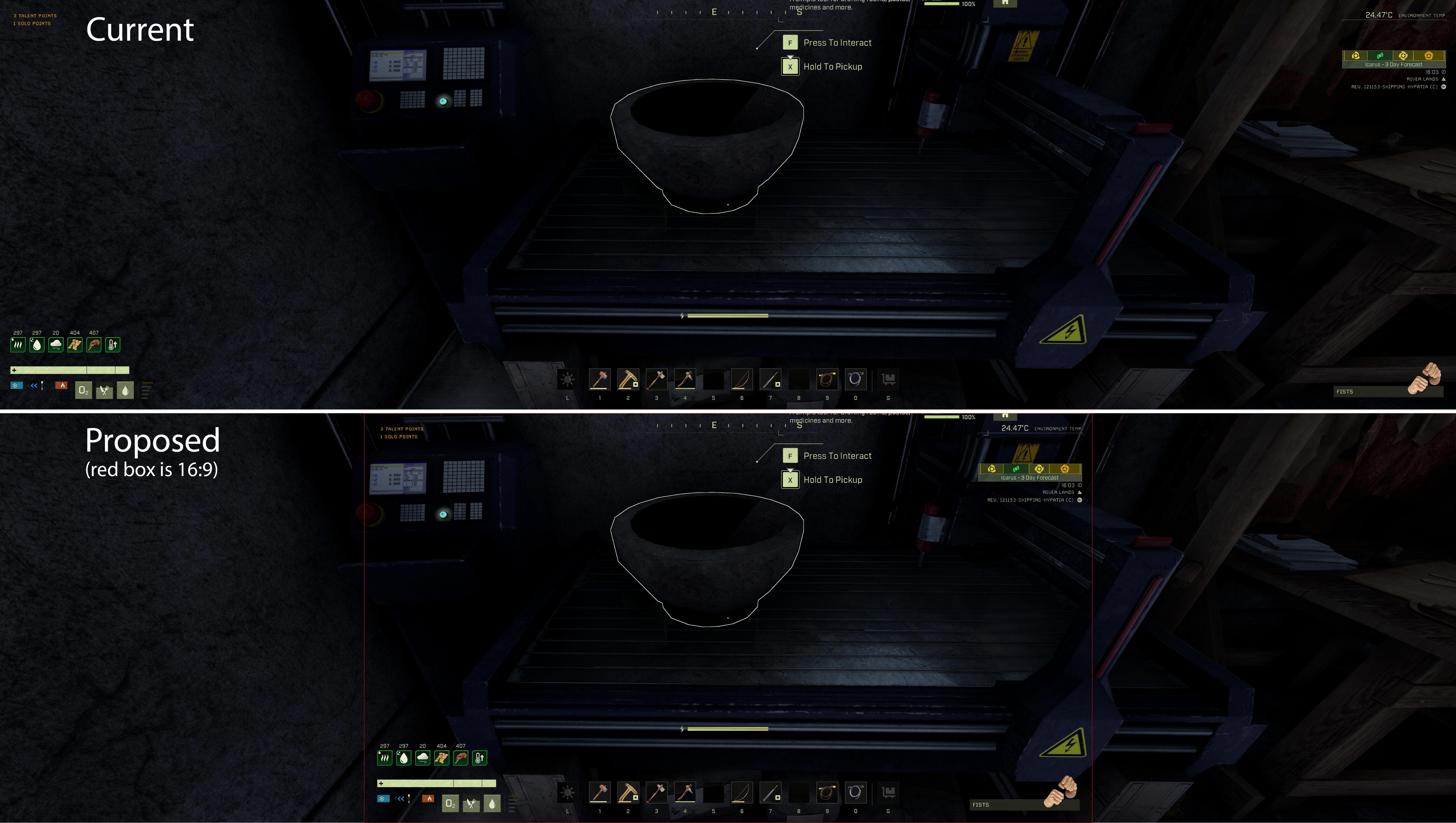
The “challenge” (trying not to call it an issue 😅) only affects deployables that run recipes, meaning devices used to craft or generate items. The recipe/inventory window gets pinned to the far left of the screen, while the Craft Queue appears on the far right, leaving the Craft button roughly in the middle.
This doesn’t seem to happen with other deployables like cabinets or crates, where the side panels appear from the center instead of the screen edges.
If adjusting this isn’t too complex, it would significantly improve the UX for ultrawide users. Constantly moving the pointer from one side of the screen to the other isn’t ideal. Ideally, players could drag these side windows anywhere on the UI, but that might be a bigger change.


Comments: 40
Oldest
•
Newest
•
Most likes
•
Fewest likes
-
12 Sep, '23
Elissa - Producer Admin MergedHighlighted comment
Unfortunately, we are not actively doing anything to do with ultra wide support at the moment. In time, we may, but what we have at the moment is all we will have. Thanks! -
28 Aug, '21
Jimmy MergedHonestly having an ultra wide monitor just to find out games are still doing some weird vertical zoom in and does not actually do what it is supposed to do, and no just setting up the FOV higher just starts giving a weird as hell fish bowl effect. I'd post screen shots but this forum so bloody limited
-
10 Sep, '21
Matthew van Andel MergedI am not exaggerating when I say the game is completely unplayable like this on modern ultrawide gaming monitors. It's playing with binoculars strapped to your face.
This should be an easy fix: you need switch your display scaling from whatever god-forsaken default you're using now (appears to be vert-) to hor+
Again, this is little more than a single setting change in most game engines... but you really need to add a FOV slider in game to cover all your bases. -
10 Sep, '21
Elissa - Producer Admin MergedWe are always changing and adapting and trying to cater to everyone's hardware and software, thanks for your feedback.
-
10 Sep, '21
Dalluge MergedThe ultrawide is definitely broken compared to other First Person games. Seems to be very "zoomed in" when playing Icarus and it's forced me to play windowed mode 16:9 because of it... really disappointing because I thought ultrawide was supported properly.
-
11 Sep, '21
Mantauk MergedI play on 3440 x 1440 UW and it looks great. Wth are you guys talking about? Please provide screens or links to images!
-
12 Sep, '21
MsMirDur MergedMine is somewhat playable on my 2560x1080 LG Ultrawide in low settings. But I have a bit of an older PC and it's too hard on my processor. So, I'm just using ultrawide in splitscreen for the Discord and this site and playing on my other gaming monitor on mediurm.
-
27 Sep, '21
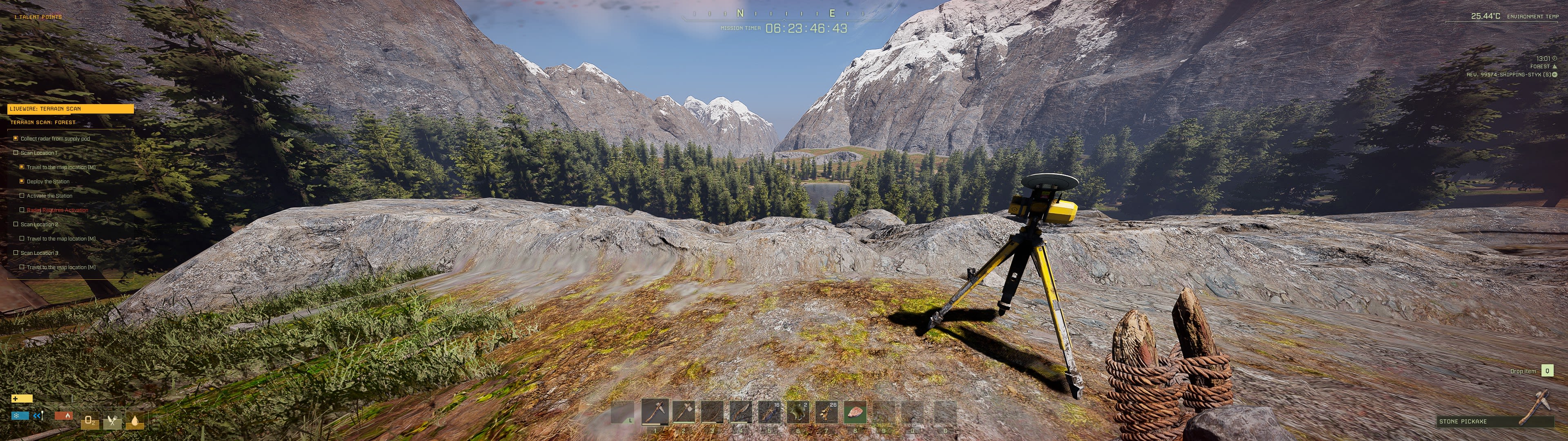
HiJack Merged5120x1440 here 32:9 is very zoomed in. I didn't realize how good the bows looked until I watched standard resolution streams.
-
04 Dec, '21
chris chick MergedYeah I am on a Odyssey currently and when using the bow its like im holding a spear. I can see the tip of the arrow coming up the middle of the screen. Top of axe as well. As far as pictures I included someone elses link to the same issue below.
https://www.reddit.com/r/SurviveIcarus/comments/q57nlg/playing_329_aspect_ratio_the_screen_is_cropped/ -
08 Dec, '21
gnif MergedIt's 2021 and you're using the Unreal engine which can handle calculating the correct aspect ratio for ultrawide projections... why this doesn't work out of the box is beyond a joke.
-
11 Dec, '21
Kyle MergedUltra wide support 5120 x 1440
Happy to help with the math if your devs need it; pretty easy once you're used to doing the calculations. :)
Elissa Snowball, could you DM me on what your needs are for your team? -
20 Dec, '21
Neyna MergedPlease add real ultrawide support, not a bad zoom of 16:9 picture making us lose 40% of visibility.
See that steam post : https://steamcommunity.com/app/1149460/discussions/0/3037104113129462607/ -
14 Dec, '22
Bokumetsu MergedCan you guys please just do the fix? Its been over a year and a half since you guys said in an official capacity that there will be Ultrawide support and its just not there yet.
-
10 Feb, '23
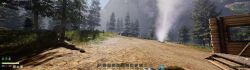
DEDantiSocial MergedI know there was an increase to the FOV slider but it does nothing to actually support ultrawide, all it does is create the fish eye effect if it's increased too much. The game needs a vertical FOV slider instead of a horizontal one if possible. I love this game but since I got a new monitor and i play on 32:9 (5120x1440) and everything is zoomed in. It feels like i'm only getting half the screen, I can barely see what weapons I have equipped and if I am using a bowi can't even see the arrow in it, This has all made the game unplayable for me which is sad because I absolutely love this game. I've tried many online fixes that I've found including a command line to maintain FOV despite resolution and aspect ratio but none of these really work well enough to be considered fixes.
-
12 Feb, '23
Elissa - Producer System Merged"Actual ultrawide support." (suggested by DEDantiSocial on 2023-02-10), including upvotes (1) and comments (0), was merged into this suggestion.
-
28 Aug, '23
Daniel Roberts MergedI believe this was being looked in but then it still hasn't been fixed. Right now the game facilitates ultrawide scaling by cropping the upper and lower part of the fov and essentially zooming in on the screen. Can the game be scaled by maintaining the vertical fov of 16:9 and expanding the viewport horizontally?
-
30 Aug, '23
Elissa - Producer System Merged"Horizontal scaling for Ultrawide resolutions" (suggested by Daniel Roberts on 2023-08-28), including upvotes (1) and comments (0), was merged into this suggestion.
-
09 Sep, '23
Daniel Roberts MergedI appreciate the merges at least keeping this topic going but can we have a response to this? It's the only thing preventing me from purchasing the game at the moment.
-
10 Apr, '24
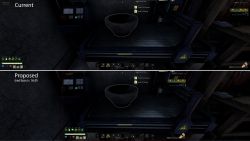
Taryngar MergedAlong with implementing proper 21:9 and 32:9 aspect ratios so you can see the parts of the vertical viewport that are getting cropped, another thing I'd like to suggest with regards to this is a way to tell the UI elements to be in the center 16:9 part of the screen, instead of being snapped to the far left and right edges. Right now, if I want to stream Icarus on my 7680x2160 Odyssey Neo 57", I *have* to play in windowed mode, because fullscreen would mean horrible letterboxing, and cropping it would mean you'd see none of the relevant HUD information. Windowed mode presents its own set of problems also reported in this tracker with regards to mouse cursor locking. Playing like this in fullscreen also means I give myself whiplash having to look, for instance, from my inventory to a bench's inventory. I'm attaching an example of what I would like to see as an option somewhere in the settings to snap the entire HUD to the center 16:9 aspect ratio.
-
25 Jan, '25
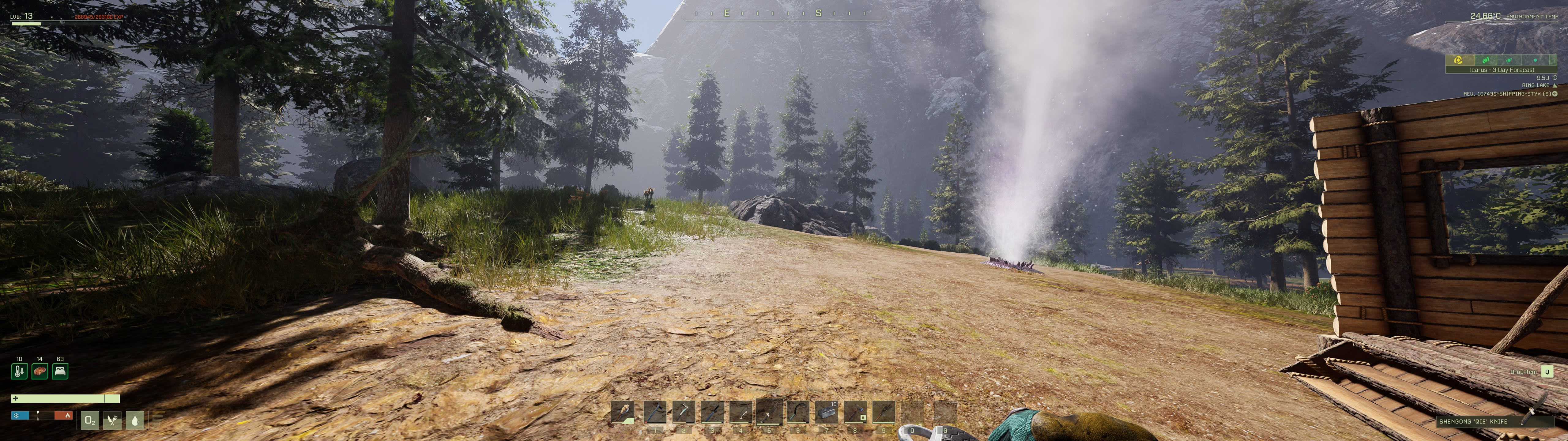
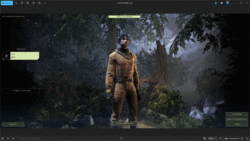
FURILKA MergedI have a 49" ultrawide monitor with a 32:9 aspect ratio (5120x1440 pixels) and my game looks like it was cut off at the top and bottom to stretch it horizontally. Here are two screenshots: at 2560x1440 (16:9) and 5120x1440 (32:9). In the second case (5120x1440) the game looks like half of my screen was stolen at the top and bottom lol.
-
31 Mar, '25
Rev MergedI hope more work is being done on genuine Ultrawide support. I just watched a couple of videos on YouTube, and I realized people on 16x9 screens can actually see the items in their hands. Weapons and tools are almost non-existent on 21x9 and 32x9 resolutions. :-(
-
10 Sep, '25
Elissa - Producer Admin MergedUnfortunately, we are not actively doing anything to do with ultra wide support at the moment. In time, we may, but what we have at the moment is all we will have. Thanks!
-
13 Sep, '25
Jim MergedElissa, it's been 5 years and ya'll only just have the will to reply? and say that when the fix is legit adding a single line into "engine.ini"
Thanks for being New Zealands worst game dev. What a joke. -
14 Sep, '25
Elissa - Producer Admin MergedIf you scroll up a bit, you'll see that it was the same response I gave two years ago :)
-
15 Sep, '25
Jim MergedThat reply didnt hit how you thought it was going to.. that makes it so much worse for you guys.
-
15 Sep, '25
Ultra Wide Screen Enjoyer MergedI am an indie developer and I have 2 games published on Steam. One released in 2022, another in 2024. I do not use engines. Both of my games have a widescreen and ultra wide screen support - it is very easy to implement.
It's 2025, I go on Steam and buy this interesting looking game Icarus, it is pretty big game, uses state of the art engine, clearly a decent size team is at work.
I launch it.
There is no ultra wide screen support.
What the fuck. -
15 Sep, '25
Elissa - Producer Admin MergedUnfortunately we are focusing on our DLC and weekly updates (including lots of performance updates, multiplayer fixes and content) and we have very specific things each team member looks at. Ultra wide support has not been on our radar and still is not - it is very low on our priority list - take a look at our Steam page if you need more details. :) thanks for all your comments.
-
16 Sep, '25
gnif MergedSo the three or four lines of code it would take to fix the calculation for the wide aspect ratio is too big a task to even put on your radar?
A good developer would have calculated the aspect ratio of the screen (it's not hard, width ÷ height) and used this to calculate the projection matrix, not relied on some arbitrary hard coded values as you seem to have done.
This is beyond ridiculous -
16 Sep, '25
Ultra Wide Screen Enjoyer Merged@gniff funny thing is - unreal does all of this for you, it's a question of going into the project settings and clicking
-
16 Sep, '25
Rev MergedYeah, I have to say this is pretty disappointing to see.
I had a fantastic time with the game two years ago when I picked up the Supporter Edition, but I've barely played more than five hours since I upgraded to an ultrawide. Every time the game pops up in my Steam newsfeed with the weekly updates, I keep hoping to see actual UW support, and yet every week it remains uninstalled.
The only thing I can do (and have done) is change my Steam review from positive to negative. -
24 Jan
Thor MergedThis is an old thread, but for anyone ending up here in the future; there is a manual "fix" (not perfect) that can be done to this and many other Unreal Engine games.
Step 1 - Go to folder "USER/AppData/Local/Icarus/Saved/Config/WindowsNoEditor"
Step 2 - Open "Engine.ini" in a text editor and paste the following at the bottom below all the "Path" lines:
[/script/engine.localplayer]
AspectRatioAxisConstraint=AspectRatio_MaintainYFOV
Step 3 - Save the file, boot the game, and adjust your FoV. DONE
Note to Players: This does not fix some things like tools being mostly off-screen and does nothing about the hud elements being scattered to the four corners of your amazing monitor, but it does stop the game from looking like it's being viewed through binoculars.
Note to Devs: If memory serves correctly, this setting is a config toggle in UE and should also have another option to scale the Y-axis fov from 0.0 to 1.0 which would allow for a Y-FOV slider to be added to the settings menu. -
24 Jan
Thor MergedPS Note to Devs:
A couple years ago UE made "MaintainYFOV" the default as it avoided a lot of the complaints you've seen in this thread. This is just an assumption, but I'm guessing that this change in UE was not noticed due to how long y'all have been working on the game and the prior UE versions it likely went through that did not have this setting as default.
From what I've tested so far there have been no gameplay bugs or graphical issues when changing to MaintainYFOV through the engine.ini. The only exception to this being the backgound texture of the loading screens not fitting to the screen width, but as a long-time ultra-wide user I promise you that we don't care about something like that and are VERY used to it at this point. -
17 Mar
Elissa - Producer System"[Suggestion] Actual ultra wide support" (suggested by <Hidden> on 2021-08-28), including upvotes (76) and comments (34), was merged into this suggestion.
-
26 Mar
MundusThis has been “under consideration” since ‘21 and absolutely nothing was took out of the paper by the devs? Is it really so complicated to working around and fit this amazing game on such monitors? Please guys, even using the manual trick with the FoV, it’s far away of being perfect, decent and a professional solution. Please…
-
01 May
MundusHi Elissa, it’s me again! Did the devs ever take a look at Thor’s suggestion about the UE settings? I feel like it’s at least worth trying. It sounds way simpler than leaving this in “under consideration” for 5 years. Please, guys…
-
27 Jun
MundusElissa, could you please call Mr. Dean and update the thread for us? We are still waiting for his announcement back to 2021! :D
https://steamcommunity.com/app/1149460/discussions/0/3037104113129462607/#c3037104113134726406